By C. Webster Marsh, Education Manager, Lighting Controls Academy
In the world of building projects, the Control Intent Narrative (CIN) and Sequence of Operations (SOO) have long been essential and elusive. They define how a lighting control system will function, but too often they arrive late in the process (or not at all), are inconsistent from one project to the next, and are misaligned with energy codes or industry standards. The result is confusion, rework, costly missteps during installation, ultimately leading to dissatisfied end users.
The Lighting Controls Academy (LCA) set out to change this dynamic with a new resource: Design Express. By providing standardized templates aligned with the 2024 International Energy Conservation Code (IECC) and the Illuminating Engineering Society’s (IES) LP-16, Design Express offers designers a starting point to enhance clarity and quality in lighting controls documentation.
Why the CIN and SOO Matter
A CIN and SOO are more than just a formality. According to IES LP-16 Documenting Control Intent Narratives and Sequences of Operations for Lighting Control Systems, the CIN and SOO are central to communicating design intent to all stakeholders, from owners and designers to installers and commissioning providers. Without clear CINs and SOOs, projects often experience:
• Poorly coordinated designs
• Confusion over roles and responsibilities
• Delays in programming and commissioning
• Increased risk of failing energy code inspections
• Unsatisfied end users
In short, the CIN and SOO are the backbone of a successful lighting controls project, setting the framework for the design of the lighting control system.
Workflow Improvements
Design Express addresses inconsistency in controls documentation, a longstanding pain point, and offers many workflow benefits, including:
• Early integration: Begin during schematic design, refine as the project advances.
• Reduction of miscommunication: Clearer coordination between engineers, contractors, and commissioning providers.
• Time savings: Faster setup with space‑type sequences ready to adjust.
• Training: A practical way for newer designers to learn code requirements in context.
• Structured templates: Consistent layouts across projects following IES guidelines and best practices.
• Pre‑populated code requirements: Inclusion of IECC 2024 requirements, from shutoff controls to daylight response.
• Editable fields: Designers can tailor strategies with dropdowns, checkboxes, and project‑specific notes.
• Flexibility: Unused items can be removed to streamline project deliverables.
• Documentation support: Notes and references encourage coordination across disciplines.
The result is documentation that can be easily shared in drawings, specifications, or submission packages, ensuring that all stakeholders are aligned.
Alignment with IECC 2024
The 2024 edition of IECC introduced updated requirements for automatic lighting controls, daylighting, plug load controls, and demand response readiness. The SOO helps specifiers identify these elements:
• Automatic Shutoff (C405.2.1): Narratives include occupant sensors or time-based controls in applicable spaces.
• Daylight Responsive Controls (C405.2.4): Prompts for inclusion of photosensors and dimming logic.
• Manual Control (C405.2.2): Flags spaces requiring manual control.
• Exemptions: Includes information for code exemptions, e.g.,, spaces where direct patient care is provided
• Demand Response (C405.2.7): Includes information for demand-response ready systems.
Alignment with IES Standards
Beyond code compliance, the Design Express is structured around best practices outlined in IES LP-16 and IES LP-6:
• LP-16: Ensures clarity, consistency, and completeness of SOOs. Add URL to purchase.
• LP-6: Aligns definitions and common practices with the industry standard Add URL to purchase.
Practical Applications
One of the most practical benefits of Design Express in action is the generation of a project’s Sequence of Operations in matrix format. The matrix organizes all lighting control requirements into a single, standardized format that can be tracked, edited, and verified.
• Space Types (white column): The first column is populated by the user with the spaces in a project, tying requirements directly to their location of use.
• Categories: Each column of a specific color represents a core control category:
o Occupant Sensors (purple)
o Time-Switch (taupe)
o Daylight Response (yellow)
o Manual Control (beige)
o Additional Settings (blue)
o Integration (green)
• Pre-populated values: Drop-down menus and check-boxes simplify the process of selecting compliance strategies and product types, wired or wireless devices, occupant sensor, or time switch control, and whether there is demand-response capability.
• Narratives and Notes: Each row builds toward a plain-language SOO narrative while also leaving room for detailed coordination notes and references.
Once completed, the matrix serves as a living document throughout the design and construction process. It begins with schematic design, evolves with project development, and provides clarity for final commissioning. In practice, this makes the Design Express not just a template but a tool for accountability, communication, and continuous refinement.
Below is a walk-through of how Design Express might be used to document projects and project workflow.
The Header
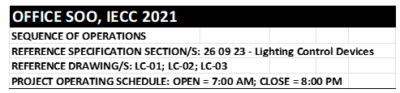
1. Select the spreadsheet template that best represents the project building type.
2. Identify the code applicable to the project. For example, if the project is in Boston, where the current code is IECC 2021, the header can be to reflect this.
3. Identify the related documents to the SOO. In the example below, spec section 26 09 23 – Lighting Control Devices and sheets LC-01 through LC-03 are included. These documents may change over the course of the project.
4. Identify the opening and closing times of the project. These hours should be discussed with the owner or client first. Note that hours change at a later point in the project.
Space Types
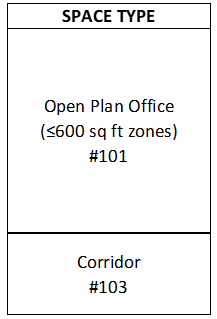
Space types vary by project, so a review is needed to identify each space type. Create a row for each space with the corresponding room numbers (as shown above). Note that most spaces can be described with generic space types, but some spaces may be unique to the project.
Project Parameters

The project parameters columns are intended to give a broad overview of how each space’s lighting controls work. If these spaces have multiple options for each parameter, these can be manually added to each type. In the example above, cells have been edited for Wired/Wireless to include “Integral” for the corridor, as this application will be using luminaires with integral sensors and dimming. Additional information about the luminaire fixture schedule will typically be shown on LC-01. The information would include, at least, the manufacturer and part number for the sensor and whether the sensor will be installed in the factory or in the field.
Occupant Sensor
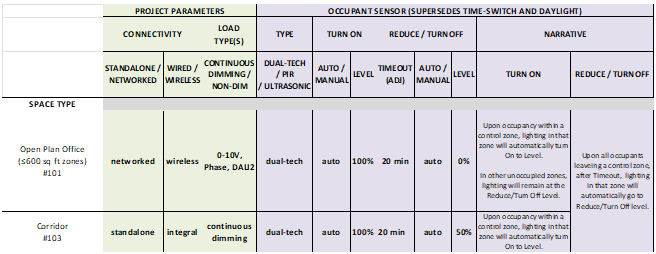
The information displayed in the occupant sensor section pertains to the use of these sensors. Some of this information has been pre-populated to meet the 2024 IECC’s requirements. In the example above, the 2021 IECC code is stipulated, requirements for this revision should be double-checked against information in the matrix, even though the 2024 IECC will likely be stricter than the 2021 version. Correct selection of the type of sensor is important because sensor types may not be shown on the drawings, or they may be shown in schematic form only. In this example, dual-tech sensors are required to avoid nuisance switching. The matrix clearly identifies the need for dual-tech sensors for both spaces without relying on schedules or other construction documentation.
The Turn On column identifies whether the sensors employ a manual or automatic method of control to turn on, what the intensity of the lighting in the space should be when activated, and the timeout for the turn-Off. The Turn Off column provides conditions for which the lighting is turned Off or dimmed. While a value higher than 0% for an automatic turn-Off is uncommon, it still applies in spaces that need lighting On for safety reasons. Note that, in the example, the corridor lighting is never turned completely Off, but dims to 60% when vacant.
The narrative column, while not required (but highly recommended as it provides the CIN ensures that the sequence of occupant sensor control is documented. In the example case, duplication of settings, such as intensity level values or timeouts, are unnecessary, because they are already provided in the narrative.
Time Switch
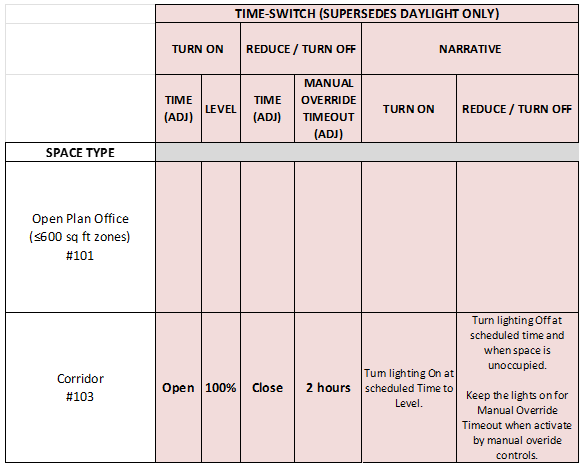
The time-switch category is like occupant sensor because it also has includes an intensity level and a narrative. , The “open” and “close” times identified in the header are referenced for control of this type of switch as well as manual override. In this example, occupant sensors in assigned to the corridor, but building staff may still wish to override the lighting for example, for an event, so a 2-hour manual override is included. If time-switch control is not needed the entire category can be removed.
Note the conditional logic required to meet the narrative: “turn lighting off at the scheduled time and when the space is unoccupied.” This ensures that the occupant sensor controls take over after hours, preventing occupants from being accidentally plunged into darkness, while also eliminating the need for a “blink warn.”
Daylight Response
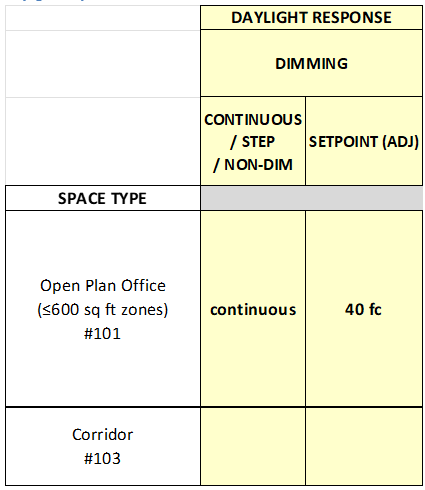
The daylight response category is deceptively simple, as it consists of only two columns. The goal of these two columns is to communicate with the installer and commissioning provider what the expected behavior of the lighting in a daylight zone should be. In the example, continuous dimming in the open plan office is required. The target light levels on the task surface are the IES-recommended average light level of 40 fc.
Manual Control
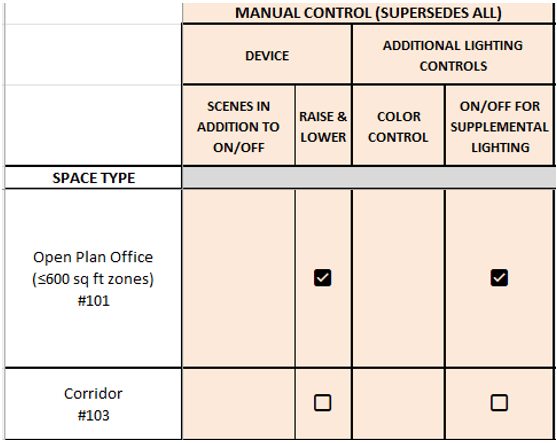
The section for manual control focuses on user interfaces. Different scenes that will be displayed on the keypads, touchscreens, or other touchpoints are identified, as well as identification of any raise/lower buttons, or color control, and whether supplemental lighting (such as task lights in cubicles) needs dedicated On/Off control.
Note that while the information that can be entered into Design Express for manual control is not comprehensive, it is sufficient for meeting code requirements. Providing as much information regarding manual control as possible helps the manufacturer generate a better quote, helps the technician to program the system, and helps the commissioning provider to verify that the system performs correctly.
Additional Settings
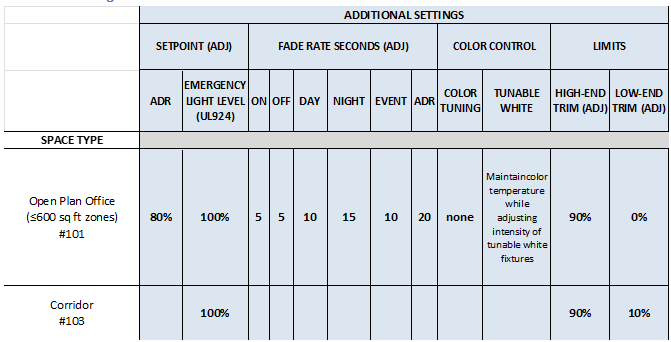
The additional settings category is intended for more advanced features, such as Automated Demand Response (ADR). While not necessary for most projects, this section was included to document the presence or absence of these features.
In the example, the demand-responsive controls are required to dim lighting to 80% brightness when an ADR event is triggered. Additionally, the National Electrical Code (NEC) now allows lighting to be dimmed during an emergency event. The example includes a note confirming that the emergency lighting should less go to 100% output during an emergency.
Another type of setting that may be documented are fade rates, an important and often overlooked specification. While many systems have default programming for fade rates, fade rates may be lengthened to avoid detection, especially for ADR events.
A tunable white light narrative is included to elaborate on the operational intent.
And last, fixture high-end and low-end trims may be documented to meet a code requirement or to prevent poor dimming at the low end of the curve.
Additional features, such as tuning the high-end trim to compensate for the loss of output from the luminaire, can be added using the narrative column inserted next to the trim limits.
Integration
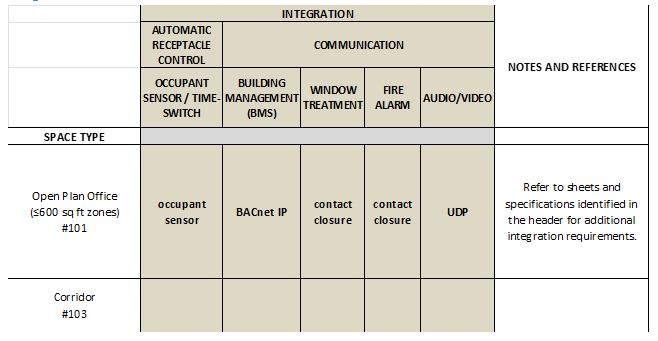
This section is intended to provide basic documentation rather than a complete sequence. Each integration requires its own mini-SOO to communicate how the integration will be achieved, behaviors, setpoints, etc. In the example several integration points are identified and a note is added referring the reviewer to other documents for additional information not shown. Integration information should be coordinated and confirmed with the specifier for each trade.
Conclusion
Design Express represents a practical advancement in the documentation of lighting controls. By combining the rigor of 2024 IECC compliance with the guidance of IES LP-16 and LP-6 standards, it transforms the Sequence of Operations from a tedious task into a streamlined, standardized process that benefits the entire project team.
For specifiers, contractors, commissioning providers, and owners alike, Design Express provides a consistent message: With a clear SOO, workflow improves and compliance strengthens. The Lighting Controls Academy’s Design Express will help the lighting controls industry realize projects that begin with clarity and end with confidence.
Get the beta version for office buildings here. The official launch for the first 10 templates will coincide with NYControlled on October 15.